Need a code to enter in your own Muse account? Use the free community pool. Already have your own code and want help finding people to redeem it? That is what the optional 30-use service is for. These are two different goals. You do not need to pay MuseInvite to obtain a community code, and paying for the service does not redeem somebody else’s code in your account.
MuseInvite is an independent third-party service and is not affiliated with Meta. The referral rules discussed here are based on the official replies last checked on October 4, 2026, linked in Sources. This article was edited on October 19; that is not a new verification of Muse’s offer. The eligibility, capacity, interface, and rewards shown in your current Muse account take priority.
Choose the option that matches your goal
| Your goal | Where to start | What happens next |
|---|---|---|
| Enter another person’s code in your account | Get a free community code | Copy it, then redeem it yourself in Muse if your account qualifies. |
| Share your own code without paying | Submit it to the free pool | Visitors may see and use it. A listing does not guarantee redemptions. |
| Get help finding people to use your own code | Review the 30-use service | Submit your own code and contact email, then complete the separate payment step. |
The current paid package is USD 29 for 30 invite-code uses. It is a one-time service fee, with any applicable taxes and final total shown at checkout. It does not buy an invite code, a Muse subscription, or tokens issued directly by MuseInvite.
What the free options do
If you are joining Muse and need somebody else’s code, start with the free pool. Copying is only the first step: sign in to the intended Muse account, find its redemption entry, submit the complete code, and read the result. Follow the redemption guide for the published menu route and checks.
The cited offer describes a 48-hour window after account creation. Choosing a different code does not restart that window. Community codes may also run out of uses between listing and redemption, so Muse’s response to your attempt matters more than the fact that a code appeared on this website.
If you own a code, the free sharing form lets you add it to the public pool. Visitors choose whether to redeem a code; views, copies, and shares are not completed invitations. Use this option when you want visibility without paying and can accept that the number of redemptions will vary.
Check your own code before ordering the 30-use service
Use the personal code issued to your own account, not a code you copied from our pool or received from somebody else. If you are unsure which one is yours, read how to find and verify your own Muse invite code first.
- Check the limit, completed invitations, and remaining capacity shown in Muse.
- Keep a private record of your invitation count and reward balance before ordering so you can compare the result later.
- The package is for 30 uses. If your code already has uses or its available capacity is below 30, contact us before paying to confirm whether this package fits.
- Provide the complete invite code and an email address you can receive mail at. Contact us by email if you need to explain a code or order issue.
We do not need your Muse password, login cookie, verification code, or account access. A paid-service submission does not require adding your code to the public community pool. Read the service and payment terms and privacy policy before submitting the form.
What happens after you pay
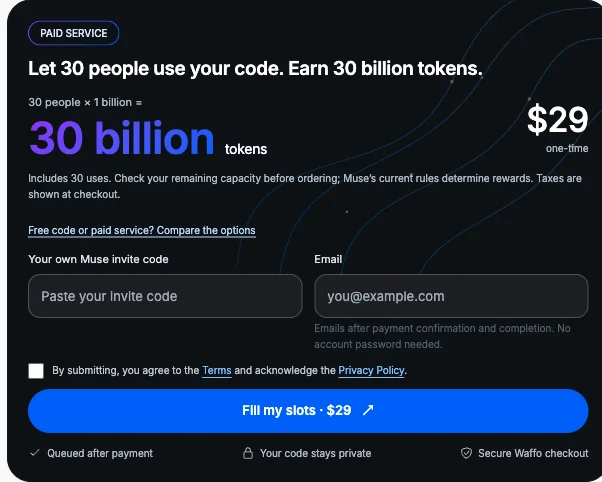
- Submit your code and email in the 30-use service form, accept the terms, and continue to the Waffo checkout.
- Complete payment at checkout. Creating a checkout session or returning to the website does not by itself confirm payment.
- After confirmed payment, we email an acknowledgment and start right away. Past orders were usually completed within 1 hour.
- When the order is marked complete, we send a completion email. Keep the order reference for any follow-up.
Past orders were usually completed within 1 hour; peak times or late nights may take a little longer. If you need to correct the code or contact email, have a payment question, or cannot find an expected message, contact me@liwanx.com with your order reference. Check your spam folder as well. Cancellation and refund requests follow the checkout terms and payment provider’s process; this guide does not add a separate refund promise.
Verify the result in Muse
After the completion email, sign in to the same Muse account and compare the invitation count and token rewards with your record from before the order. Completed qualifying redemptions are the relevant result. Copies on the community website and a payment receipt do not establish that Muse credited a reward.
The historical official replies describe 1 billion tokens for each person per qualifying redemption, with 30 uses in one reply and 20–30 depending on the rollout in another. Under a 30-use, 1B-per-use offer, 30 qualifying redemptions would total 30B tokens for the inviter. This calculation is conditional on your account’s offer; Muse determines eligibility and issues rewards.
If the result does not match, reply to the completion email with your order reference and the difference you see. A screenshot with unrelated personal details hidden can help explain it. To compare the code limit and reward calculation, see the uses-limit guide. If you simply need a code to redeem yourself, the community pool remains free.